Bill payments
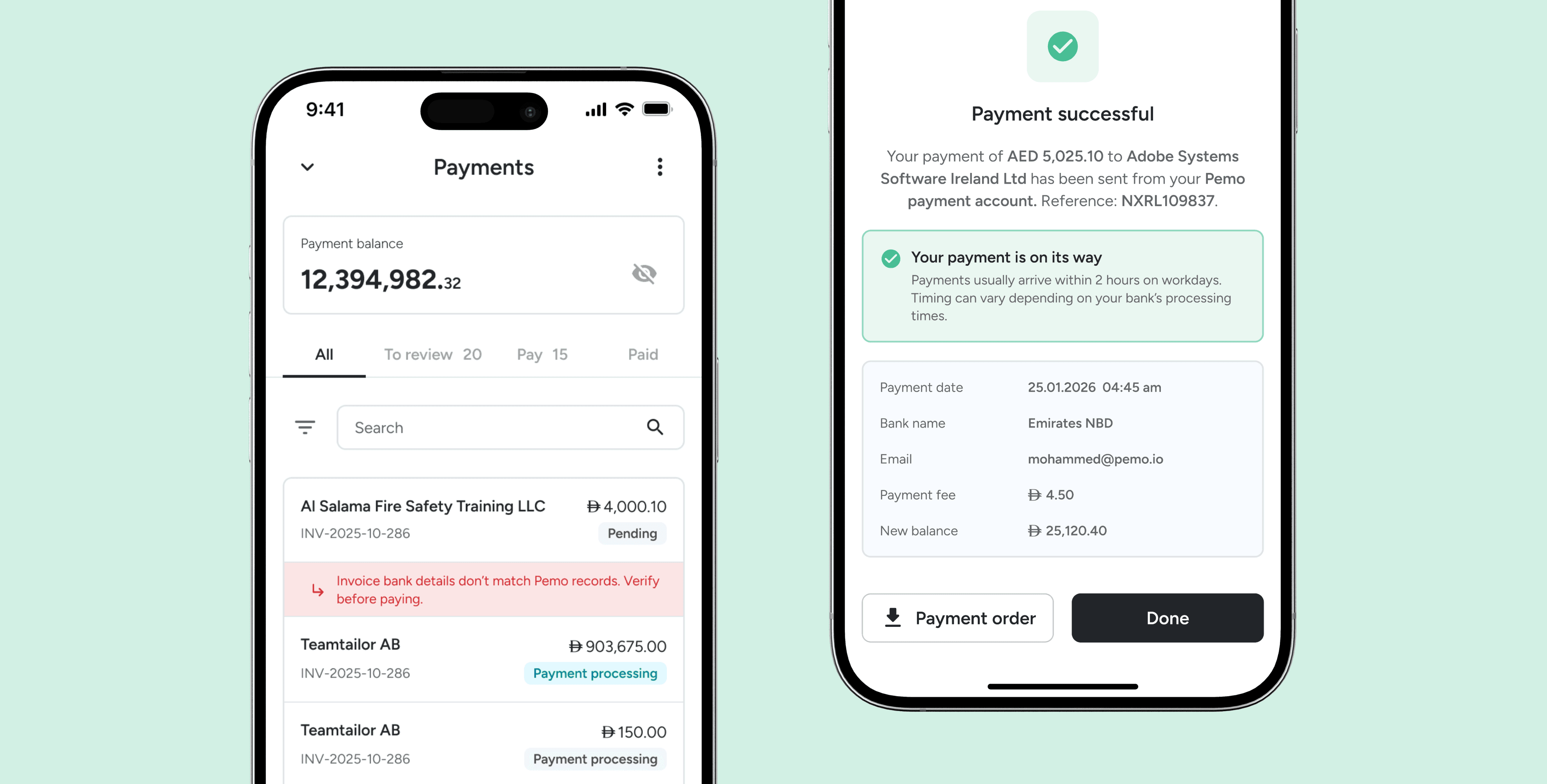
With Bill Payments, users can pay their invoices directly on the platform, with all their accounting data consolidated in one place. No more switching in and out of the app to make payments, it's all one seamless flow.
CLIENT
Pemo
Role
Product designer
Team
Product manager, Front-end, Back-end, QA
Problem statement
How can we help business owners pay bills on the Pemo platform?
This project had two starting points. One was to create a new revenue stream, the other was a broader goal to build a financial operating system. As part of that, I was tasked with expanding the product to support additional payment methods, starting with bill payments.
Solution
Bills and Payments, working together
I designed a two part flow: Bills, where clerks upload invoices and manage approval policies, and Payments, where an authorized signatory reviews and releases the money. It's built around a two role approval structure so no one can move money on their own, with automatic checks along the way for things like duplicate bills, mismatched invoice details, and outdated IBANs.


Research and analysis
Customer feedback
This feature was specifically requested by our customers and tracked through Featurebase, which helped us gather feedback and create an initial list of key topics to include on the page.
Internal conversations & Brainstorming session
We ran a few brainstorming sessions to figure out the structure of this payment flow. It would affect other parts of the app and how we'd handle future features down the line, so we wanted to get it right early. The big question was what our MVP should look like: something we could launch, test properly, and build on, while still respecting what stakeholders needed most.
Competitor research
At the time there weren't any direct competitors doing exactly what we were building, so I looked elsewhere. We looked at more complex products, ones with different concepts or in other markets, to see how they'd tackled similar challenges. Their solutions weren't always a perfect fit for us, but they still pointed us in the right direction.

Context & Constraints
As the concept kept growing, I had to make tough calls on what to include and what to leave out. We wanted to keep things lean, since testing thoroughly with Ruya Bank was already going to take up most of our time and attention.
Must haves
Pay uploaded Bills
Security flags
Duplicates
Invoice details not matching
Updated IBAN
Approval policy should be active
New user roles
Auto-extract fields
Bulk payments
Sending out communications to receivers
Leave it for later
Scheduled payments
Paying foreign currency bills
Link payments to existing transactions
Vendor management
Clarified failure reasons (we didn't know before testing)
Payments in installments
One global wallet
Transfer between wallets
Recurring bills
Userflow
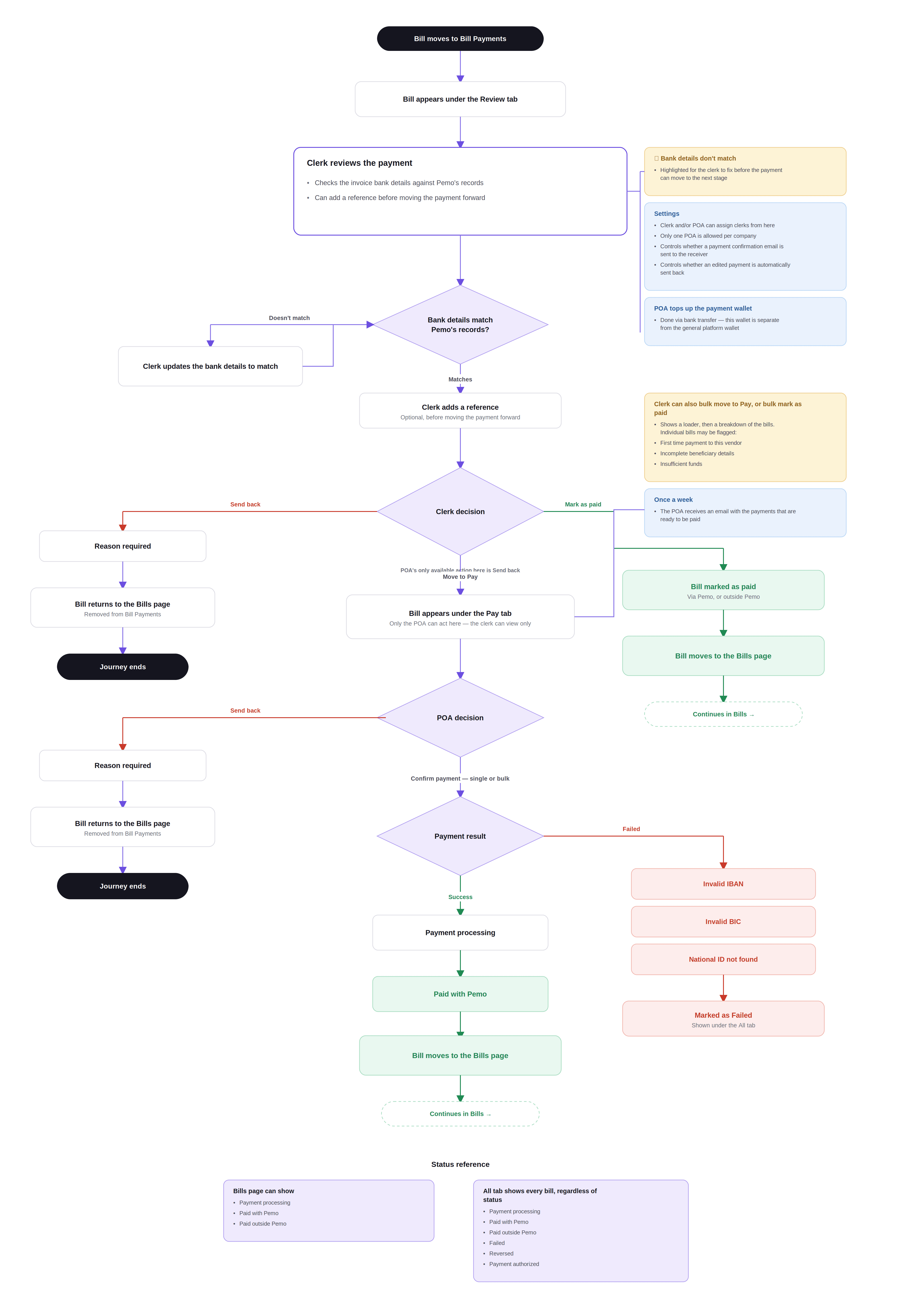
Before I could start designing screens, I needed to nail down the user flows first. Small changes here would have a big impact on both the Bills section and the Payment section, especially since Payments is a continuation of Bills.
Flow 1: Bills and Approvals
The bills and approvals flow is separate from the payment flow. This is where the user starts their whole journey. Bills is its own page, where the clerk can manage approval policies and vendor details.

Flow 2: Payments
Payments, on the other hand, is more complicated, since there's a lot more involved. A bill can even get sent back to the Bills page and restart the whole journey.
Design process
This process wasn't smooth. During wireframing, we went back and forth quite a bit, adjusting designs as small changes and new decisions came up along the way. Here are a couple of items that needed special attention from our side.
Not everything makes it to mobile
Like a lot of apps, some features that work on desktop don't make it to mobile. Vendor management is one of them, since it's tied to accounting on desktop, a feature that isn't available on mobile yet.
Small touches, big reassurance
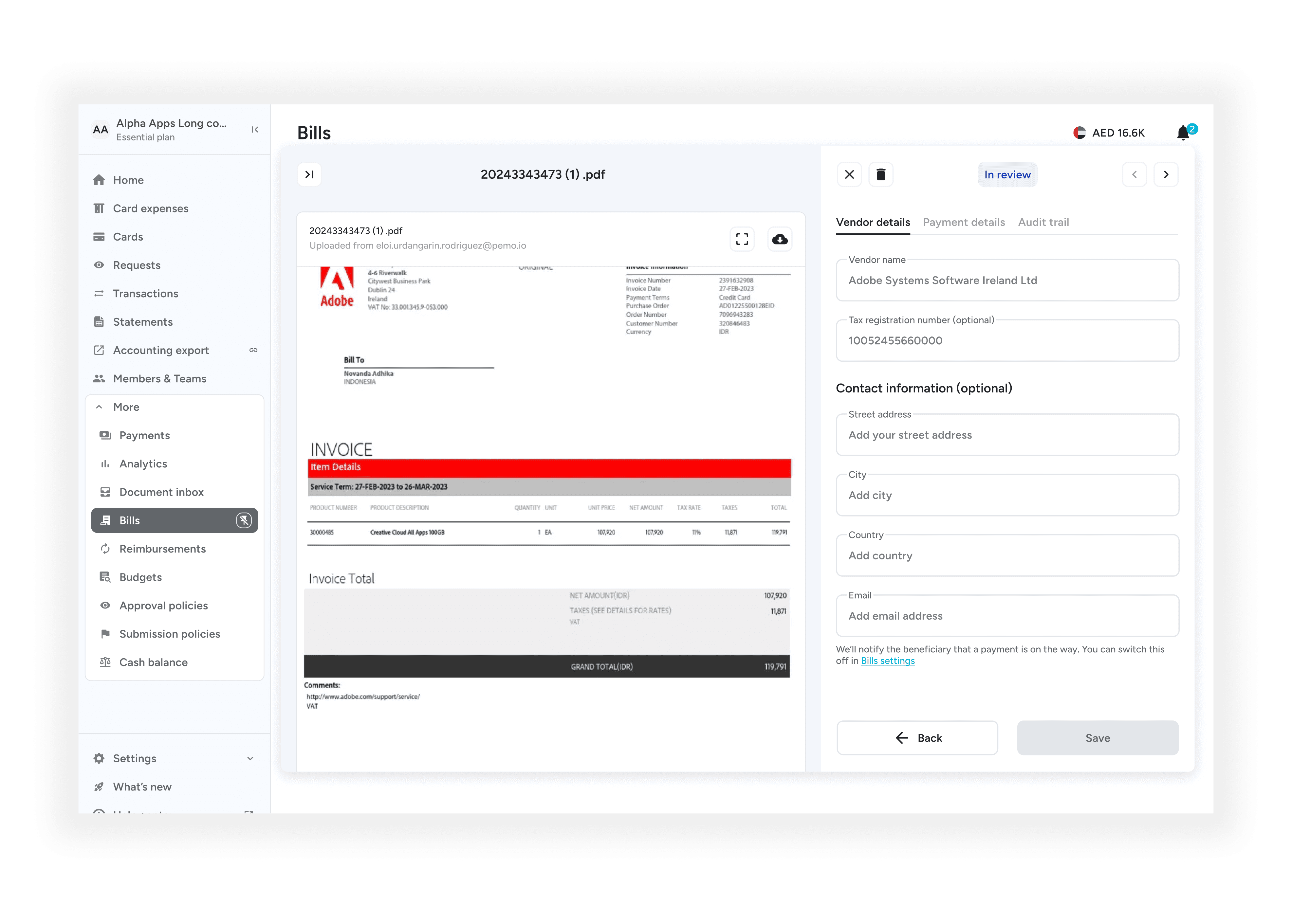
We weren't able to ship some of the bigger related features, but I focused on small, thoughtful details that could still make a big difference. In this case, I highlighted bills that need extra attention, things like duplicated bills, first time payments, changes to payment details, incomplete beneficiary details, and more.

Communication is key
During this flow, users needed to stay updated on the various states, failure reasons, and changes. I put a lot of attention into channels like email, push notifications, and in-app notifications, so everyone knew where things stood.

Where it stands today
The solution is nowhere close to perfect, but that wasn't the goal of this project. It needed to exist first, so we could improve it. With internal and external testing from selected clients, we can now make better informed decisions going forward.
The flow below shows the happy path, with two user roles merged into one view. The clerk's job is to move payments to the Pay tab. They've already filled in the details back in the Bills flow, so here they're just checking things over before payment. From the Pay tab, the person with power of attorney can officially make the payment, unless both roles happen to be assigned to the same person. Like most companies, this setup needs two people to verify payments, so no one can move money into unauthorised accounts on their own.